How can I contact customer support?
You can contact customer support by phone at +421 54 3214444 or +421 908 087622, by email at info@proxisnet.sk, or in person at Dlhý rad 17 in Bardejov on working days from 8:00 to 16:30.

Find answers to common questions about our services. If your question is not listed, please contact us.
You can contact customer support by phone at +421 54 3214444 or +421 908 087622, by email at info@proxisnet.sk, or in person at Dlhý rad 17 in Bardejov on working days from 8:00 to 16:30.
We offer high-speed internet through NG PON optical networks and WIFI, as well as television services in DVB-C and OTT formats.
For business customers, we can provide a backup 5G internet connection and a static public IP address. A reverse DNS (PTR) record can also be configured for the static public IP address. Availability and the technical solution are assessed individually for each site.
We cover more than 95% of the city of Bardejov and many nearby municipalities. Check the Coverage section or contact us to verify availability.
NG PON uses optical fiber and offers speeds up to 1 Gbps with higher stability. WIFI is wireless and suitable for locations without optical infrastructure.
Installation is normally completed within 2 working days of receiving a binding order, subject to the technical conditions at the installation address.
OTT is internet television that you can watch anywhere in the world using an internet connection with a minimum bandwidth of 10 Mbps.
Yes, we offer a trial period option. Contact us for more information about the conditions.
Report the fault on our emergency line at +421 948 776947. Resolution time depends on the type of fault. If the fault is on the customer side, it is normally resolved within the next 2 working days after it is reported. For business customers, we aim to resolve it on the same working day or the next working day.
A fault affecting multiple customers in the same location is handled automatically every day, including weekends and public holidays, between 08:00 and 20:00.
No login credentials are required to connect your own router. Follow these three steps.
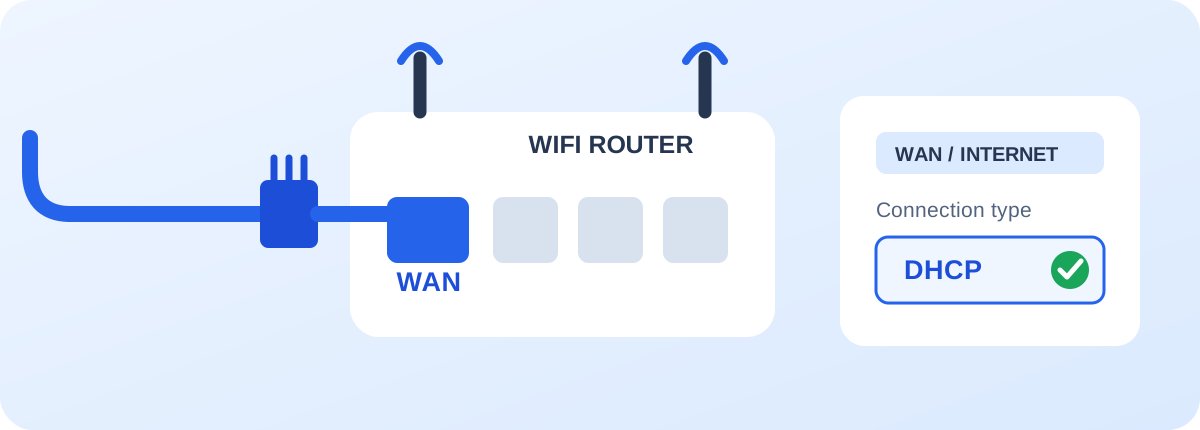
Connect the network cable from ProxisNET to the port labelled WAN or INTERNET. Do not connect it to a LAN port.
In the WAN or Internet settings, select automatic IP address assignment, usually called DHCP or Dynamic IP.
If you replace your WIFI router, contact us and provide the WAN MAC address of the new device so that we can authorise it on the network.
We use Mercusys MR30G, MR50G and MR70X WIFI routers. You may also connect another compatible router with an Ethernet WAN port and DHCP client support.
MAC: The WAN MAC address can be found on the router label or in its administration interface. Do not confuse it with the WIFI or LAN MAC address.